


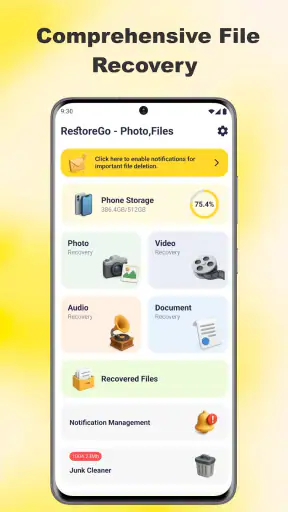
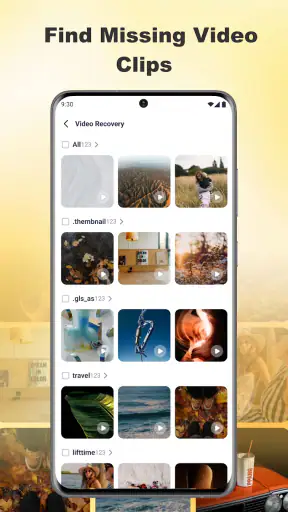
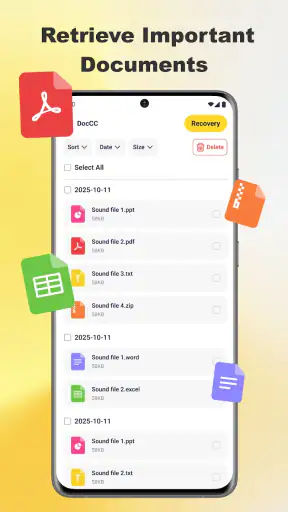
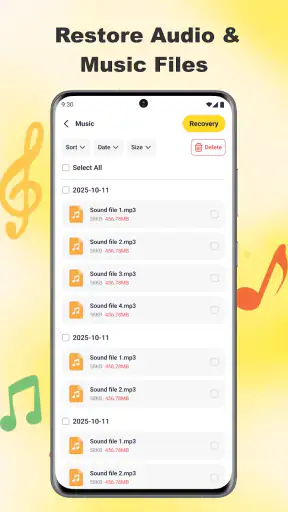
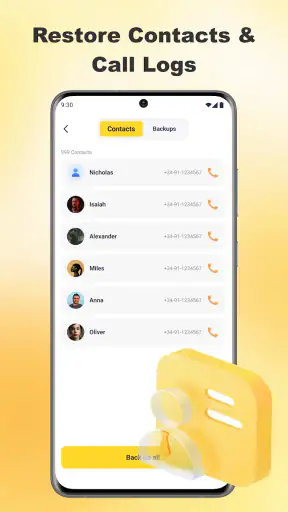
I first looked at RestoreGo as the kind of tool people open only after something has gone wrong: a photo disappears, a video is deleted by mistake, or an important file is no longer where it should be. That makes it easy to judge too quickly. A recovery app is not really about having a long list of buttons; it is about whether it helps you search calmly, understand what it can find, and avoid making the situation worse.
RestoreGo - Photo, Files is a free Android utility from WAKStudios, built for restoring deleted photos, videos, and files. In my experience, its appeal is straightforward. It gives a household a dedicated place to try recovery instead of relying only on the phone’s gallery or file manager. That can be useful on a shared tablet, a family phone, or a device used by several people with different levels of technical confidence.
The app has a 4.7 average from around 5K ratings and has passed 1M+ installs, which gives it a reassuring level of visibility among Android users. It is marked for Everyone, runs on Android 7.0 and later, and is currently at version 1.0.2. Those details matter when an older family device is involved, because a recovery tool is not very helpful if the phone cannot run it.
How RestoreGo fits into a shared household device
A realistic example is a family tablet used for school pictures, holiday videos, screenshots, and downloaded documents. One person may delete a folder while clearing storage, while another person still needs something inside it. On a personal phone, the owner usually knows what was removed and when. On a shared device, that context is often missing, so the first challenge is identifying what happened before tapping through recovery options.
This is where I see the strongest everyday role for RestoreGo. It can act as a second place to look when the normal gallery or file manager no longer shows the item. I would not treat it as a guarantee that every deleted file will return, but it is a sensible first attempt when the loss is recent and the device has not been heavily used since then.
My practical advice is to stop creating new photos, downloading large files, or installing several other utilities immediately after a deletion. New activity can make recovery more difficult on many types of storage because old space may be reused. RestoreGo cannot change that basic limitation. The app is most useful when it is opened promptly and used with a clear idea of what was lost.
For a shared device, I would also ask everyone to pause before repeating a scan. If a child deletes a video and a parent starts trying random cleanup tools, the household may unintentionally add more activity to the storage. A simple message such as “do not take new pictures until we check” can be more valuable than rushing through several recovery attempts.
What I would try first after a deletion
I would begin by checking the phone’s ordinary recycle or trash locations, if the gallery or file manager provides them. Those locations are usually easier to understand and may preserve the original organization. RestoreGo becomes more interesting when those normal options do not help, or when the missing item was a general file rather than a gallery image.
Next, I would open the app and keep the search focused on the type of item that disappeared. If the problem is one missing school document, I would not begin by treating the entire device as a cleanup project. A narrower goal makes it easier to recognize the correct result and reduces the chance of restoring an unrelated duplicate.
One useful habit is to compare names, file types, and approximate dates before restoring anything. Deleted media can appear with confusing names or several similar versions. In a household, that matters because a restored file may belong to another person. I would preview or inspect the candidate carefully where the app allows it, then restore only the item that can be identified with confidence.
The best recovery workflow is cautious search first, restoration second. That sounds obvious, but it prevents a common mistake: filling the device with duplicates simply because several results look vaguely familiar.
Setup boundaries matter more than convenience
Because RestoreGo is a recovery utility rather than a shared family workspace, I would set expectations before handing the phone to someone else. The person using it should know which device is being searched, whose files are involved, and where recovered items should go. Without that agreement, a successful recovery can still create confusion.
For example, if a shared tablet contains both a parent’s documents and a child’s videos, I would have the owner of the missing file participate in the search. That person can recognize the right image or document much faster than someone who only sees a list of filenames. It also avoids restoring private material casually just because it appears in the results.
I would not install it as a substitute for backups. Recovery tools are reactive; a backup is planned protection. If a household regularly stores irreplaceable photos on one device, the better long-term arrangement is to keep another copy somewhere reliable. RestoreGo is valuable for mistakes and surprises, but it should not become the family’s only safety net.
There is another boundary worth keeping in mind: a recovery attempt may reveal files that other users did not expect to see. On a shared device, that is a trust issue, not merely a technical one. I would use the app with the device owner’s permission and avoid browsing unrelated results. A tool that can search deleted material deserves the same care as a file cabinet containing everyone’s papers.
Coordinating the recovery without creating a second problem
When several people are involved, I find it helpful to assign one person as the operator and another as the file owner. The operator handles the device and the app, while the owner confirms what should be recovered. This small division reduces accidental taps and keeps the search focused.
I would also create a simple verbal record: what was deleted, roughly when it disappeared, and whether anyone used the device afterward. That information guides expectations. A photo deleted moments ago on a lightly used phone is a different situation from a file removed days earlier after many downloads and recordings.
After restoration, I would immediately rename or move the recovered item into an agreed folder and make a second copy. Otherwise, the household may recover the file successfully and then lose it again because nobody knows where it went. This is one of the less obvious parts of using a recovery app: finding the file is only half the job; confirming ownership and securing the result finishes it.
For a family video, I would ask the owner to verify that it opens and plays before deleting any duplicate results. For a document, I would check that the contents are readable rather than assuming that a visible filename means the file is intact. A result that appears in a scan is not automatically the same as a usable original.
RestoreGo is also better suited to a focused incident than to routine household maintenance. I would not run it every week just to see what might be recoverable. That approach can create clutter and make it harder to distinguish an urgent file from old remnants. Use it when there is a specific reason, then return to normal storage habits.
Age, trust, and the Everyone rating
The Everyone content rating makes RestoreGo approachable for a household with different age groups, and its purpose is easy to explain to an older child: it looks for deleted photos, videos, and files. Still, I would not let a child explore recovered results without an adult nearby on a shared device. The concern is not the age rating; it is that deleted content may belong to several people.
A younger user may also restore every familiar-looking image without understanding duplicates, private documents, or storage limits. An adult can help identify the correct item and decide where it belongs. That makes the app a reasonable supervised tool, but not something I would treat as an automatic family organizer.
For teenagers using their own phone, the situation is different. I would explain that recovery can expose old material and that another person should not search the device without permission. The app can help recover a lost school assignment or a memorable picture, but using it to inspect someone else’s deleted files crosses a clear privacy boundary.
The same principle applies between adults. Shared-device access does not mean unlimited access to every deleted item. If a partner or roommate asks for help, I would have the owner identify the file or operate the search themselves. That keeps coordination practical without turning a recovery attempt into an unwanted review of private data.
Where it is stronger than the usual alternatives
The usual first alternatives are a gallery trash folder, a file manager, a cloud backup, or a computer copy. Those options remain important because they are often clearer and safer. A gallery trash folder may preserve an item with its familiar context, while a backup can restore more reliably if it was configured beforehand. RestoreGo’s role is to give you another avenue when those ordinary paths do not solve the problem.
Compared with a generic file manager, it is more directly aimed at the “I deleted this” situation. A file manager is excellent for organizing existing folders, but it may not be designed to help someone search for removed content. Compared with a backup service, RestoreGo is more immediate and does not depend on having planned the backup earlier. The trade-off is that an emergency recovery attempt is inherently less predictable than retrieving a known copy.
I would choose a backup solution over RestoreGo for irreplaceable family archives, long-term photo storage, and documents that must be available across devices. I would choose the recovery app when the deletion has just happened, the normal trash area is unhelpful, and there is no usable second copy. That distinction keeps expectations realistic.
It is also worth separating recovery from storage cleanup. If your real goal is to free space, a dedicated storage analyzer or file manager may be a better fit. RestoreGo is not the app I would open to sort large media collections, remove duplicates, or create a household filing system. Its value is concentrated around locating something that has already gone missing.
Limitations I noticed in the recovery mindset
The biggest limitation is not a missing button; it is the nature of deleted storage. Results can be incomplete, duplicates can be confusing, and a file that appears discoverable may not restore perfectly. I would never promise a child or another family member that the app will bring back a lost memory. I would say it is worth trying, especially before the device is used much more.
Older Android phones and shared tablets can introduce another practical issue: limited free space. Restoring several videos at once may not be sensible if the device is already full. I would recover the most important item first, verify it, and then decide whether anything else deserves the space. This staged approach is safer than selecting everything in one pass.
There is also a human limitation. If multiple people delete and restore files without communicating, the app cannot tell the household which version matters. A restored duplicate may have a different name or location, and someone may later delete it again while trying to tidy up. Clear coordination is therefore part of the product experience, even though it happens outside the app.
Finally, I would be careful with any recovery tool on a device that contains sensitive material. Before starting, I would close unrelated apps, ask other users to step away, and avoid sharing screenshots of search results. The app’s usefulness does not remove the need for ordinary privacy habits.
Who should use it, and who should skip it
I think RestoreGo is a good match for Android users who occasionally delete photos, videos, or files by mistake and want a straightforward recovery attempt. It is especially practical for a shared household device where the normal gallery or file manager does not immediately solve the problem. The free price also makes it easy to keep in mind for an emergency rather than committing money before knowing whether it will help.
I would recommend it to a parent helping recover a child’s school video, to a household trying to retrieve a recently deleted picture, or to someone searching for a missing document on an older compatible phone. Its broad Everyone rating and support for Android 7.0 and later make it accessible across a range of family devices.
I would skip it as the primary solution if you need guaranteed archival protection, synchronized files, or a carefully managed multi-user library. I would also look elsewhere if your main task is routine storage management. In those situations, a dependable backup arrangement or a capable file organizer is the better investment of attention.
My household verdict
After looking at RestoreGo through a shared-device lens, I see it as a useful emergency tool rather than a complete household file system. WAKStudios has kept the purpose easy to understand: when a photo, video, or file disappears, this is one place to try next. Its current version, 1.0.2, is free, widely installed, and accessible to users on Android 7.0 or newer.
My recommendation is to use it with a plan. Stop unnecessary activity after the deletion, let the file owner help identify the result, restore the smallest number of items possible, and secure anything that comes back. Those steps make a bigger difference than repeatedly scanning without knowing what you are looking for.
For a household, RestoreGo is worth keeping available when a recent deletion matters, but it works best alongside backups, clear permission, and calm coordination. I would install it for the occasional recovery problem, while making sure everyone understands that recovery is an attempt, not a promise. That balance is what makes the app genuinely useful without asking it to do a job it was never meant to replace.


